
Payouts
Payouts allow merchants to send funds to a crypto address, bank account, or internal client destination.
When creating a payout, the client can either specify the exact transferAmount to send, or specify the priceAmount that should be charged. If priceAmount is used, Bitclear calculates the transfer amount using the current exchange rate.
The payout flow has four steps:
- Get a list of supported currencies with
GET /v4/currencies - Create a payout request with
POST /v4/payouts - Review the payout offer returned by the API
- Approve the offer with
POST /v4/payouts/{id}/approve
If you do not want to execute a payout after receiving the offer, ignore it. The offer is valid until expirationTime; approval after expiration returns an error.
Auto-approval
Set autoApprove to true when creating the payout to skip the manual approval step. Auto-approved payouts are approved during creation and sent for processing.
Payout states
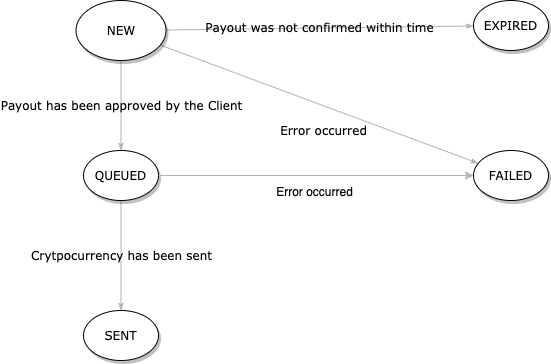
A payout can be in one of these states:
NEW- the payout offer was created but not approved yetQUEUED- the payout was approved and scheduled to be sentSENT- the payout was sent successfullyEXPIRED- the offer was not approved beforeexpirationTimeCANCELLED- the payout was cancelled
Here is the diagram representing state transitions:
Payout Limits
Bitclear API imposes payout limits based on the merchant balance and minimum payout amount.
To check your limit, call:
GET /v4/payout-limits?transferCurrency=BTC&priceCurrency=USDExample response:
{
  "available": 2.9,
  "minPayoutAmount": 0.001,
  "currency": "BTC"
}
Destination types
The destination object determines where the payout is sent.
Crypto address:
{
  "destinationType": "CRYPTO_ADDRESS",
  "cryptoAddress": "2N8hwP1WmJrFF5QWABn38y63uYLhnJYJYTF"
}
Bank account:
{
  "destinationType": "BANK_ACCOUNT"
}
Internal client:
{
  "destinationType": "INTERNAL_CLIENT",
  "internalClientCode": "CLIENT123"
}
Use cases
The following examples show two common payout flows.
Refund Exact Amount of BTC
A client paid 0.1 BTC for a product and needs a refund. The merchant requests an exact transfer amount:
{
  "transferAmount": 0.1,
  "transferCurrency": "BTC",
  "priceCurrency": "USD",
  "comment": "Refund for a purchase of a faulty product",
  "notificationUrl": "https://example.com/payout-callback",
  "externalPayoutId": "refund-123",
  "destination": {
    "destinationType": "CRYPTO_ADDRESS",
    "cryptoAddress": "2N8hwP1WmJrFF5QWABn38y63uYLhnJYJYTF"
  }
}
In response, the API returns a payout offer:
{
  "payoutId": "592cf20b-0174-4b90-b2a4-2e7209a0e3cd",
  "transferAmount": 0.1,
  "priceAmount": 111.32,
  "priceCurrency": "USD",
  "transferCurrency": "BTC",
  "comment": "Refund for a purchase of a faulty product",
  "expirationTime": "2026-06-10T12:38:50.246Z",
  "createdTime": "2026-06-10T11:38:50.246Z",
  "notificationUrl": "https://example.com/payout-callback",
  "externalPayoutId": "refund-123",
  "status": "NEW",
  "destination": {
    "destinationType": "CRYPTO_ADDRESS",
    "cryptoAddress": "2N8hwP1WmJrFF5QWABn38y63uYLhnJYJYTF"
  }
}
Approve the offer before it expires:
POST /v4/payouts/592cf20b-0174-4b90-b2a4-2e7209a0e3cd/approveThe approval response has an empty body. Use GET /v4/payouts/{id} to fetch the updated payout state.
Send a Specific Amount of Fiat Currency
Merchant wants to pay a contractor an equivalent of 100 USD:
{
  "priceAmount": 100,
  "priceCurrency": "USD",
  "transferCurrency": "BTC",
  "comment": "New logo design",
  "destination": {
    "destinationType": "CRYPTO_ADDRESS",
    "cryptoAddress": "2N8hwP1WmJrFF5QWABn38y63uYLhnJYJYTF"
  }
}
Example response:
{
  "payoutId": "592cf20b-0174-4b90-b2a4-2e7209a0e3cd",
  "transferAmount": 0.099993,
  "priceAmount": 100,
  "priceCurrency": "USD",
  "transferCurrency": "BTC",
  "comment": "New logo design",
  "expirationTime": "2026-06-10T12:38:50.246Z",
  "createdTime": "2026-06-10T11:38:50.246Z",
  "status": "NEW",
  "destination": {
    "destinationType": "CRYPTO_ADDRESS",
    "cryptoAddress": "2N8hwP1WmJrFF5QWABn38y63uYLhnJYJYTF"
  }
}
List Payouts
List payouts visible to the authenticated API client:
GET /v4/payoutsOptional filters are limit, createdTimeFrom, createdTimeTo, transferCurrency, priceCurrency, externalPayoutId, destinationAddress, and destinationCode.